Estimated Read Time: 2 Minutes
Sections in this article:
Delete One-Off Events
To delete an event:
- From the navigation menu, click Events.
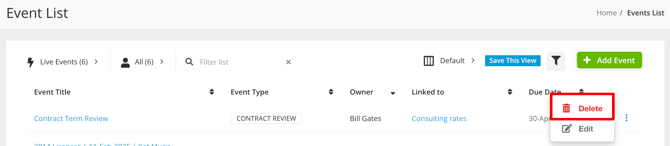
- Expand the 3 dots on the relevant event, then select Delete.
- Click OK to confirm. This process is not reversible.
Delete Recurring Events
Recurring events have been configured to repeat at regular intervals, such as monthly or annually. To delete a recurring event, you'll need to first stop the series, then delete the occurrence. To do this:
- From the navigation menu, expand Vault then click the relevant option (Vendors, Contracts, or Projects) depending on where the recurring event is located.
- Open the record associated with the recurring event, then click the Events tab.
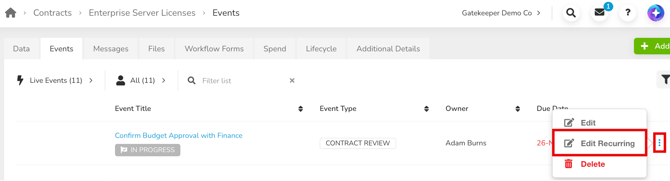
- Expand the 3 dots on the recurring event, then select Edit Recurring.
- Switch off the Recurring Event toggle.
- Click Save, then click OK to confirm.
- The event now displays without the recurring icon. Expand the 3 dots on the event, then select Delete.
- Click OK to confirm.
This process is not reversible.
Note: The Edit Recurring option is only available from the associated record's Events tab. If you're working from the global Events list instead, click the event name to open it, then click the Recurring Event link beneath the title.
Delete Events Awaiting Approval
To delete an event that is currently awaiting approval in Gatekeeper, it must first be either approved or rejected by the approver. The delete option will only become available once this has been completed. Administrators with the Users additional permission can override this by transferring ownership to themselves, but this should only be done if the event no longer requires valid approval.
To do this:
- From the navigation menu, expand Configuration, then click Users.
- Search for the user that is assigned as the approver for the event, and click on their name.
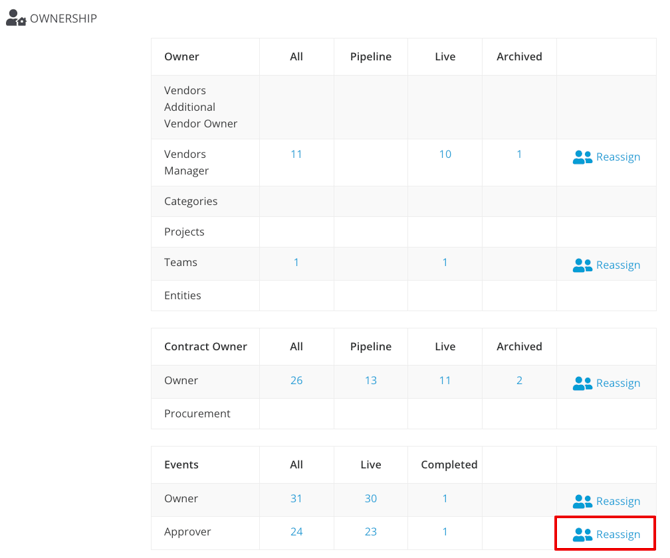
- In the Ownership section, click Reassign in the Approver row of the Events table.
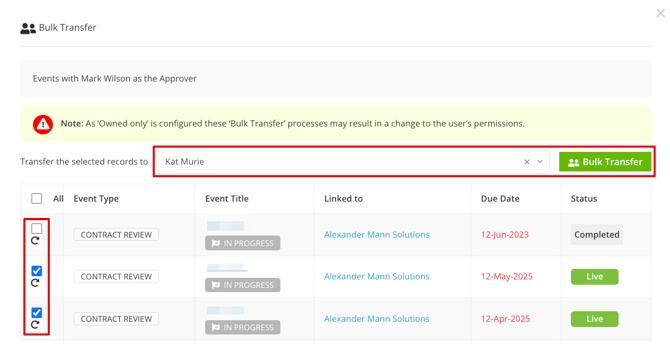
- Select the checkboxes for the events you need to delete.
- Search for your name and click Bulk Transfer.