
 Estimated Read Time: 4 minutes
Sections in this article:
Note: For an interactive introduction to workflows in Gatekeeper, take our Introduction to Workflows course. You must be logged into Gatekeeper to access this.
Introduction
Gatekeeper's workflow engine is built on Kanban principles. This is a visual approach to managing work that originated in manufacturing, and has since been widely adopted across other industries.
The word Kanban translates as "visual board", and the concept is straightforward: work items are represented as cards that move across a board from left to right as they progress through stages. The example below shows this in its simplest form: cards moving through To Do, Doing, and Done.
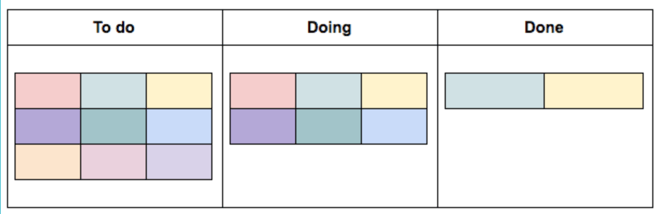
This visual structure gives all stakeholders a clear, real-time overview of where each item is in the process, making it easier to collaborate, track progress, and identify bottlenecks.
Workflow Terminology
Before getting started, it's helpful to understand the core terminology used throughout Gatekeeper's workflow engine:
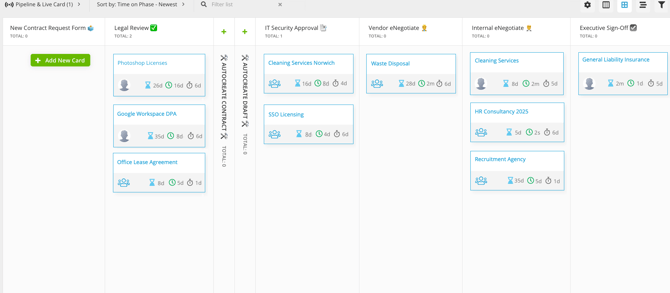
- Board: the visual representation of the workflow process.
- Phase: a stage in the workflow, representing a specific step in the process (for example, Procurement Approval or Compliance Reviews).
- Card: an individual work item moving through the process, such as a contract approval request or vendor onboarding submission.
- Owner: the user, team, or Gatekeeper Agent responsible for completing the actions required within a phase. Each phase can have one or many owners.
- Form: digital questionnaires stored in each card that collect data required for the process.
- Transition: the logic that controls how a card moves from one phase to the next. They can be straightforward, for example, when approval is given, move the card forward. Alternatively, they can be conditional, routing cards differently based on the data collected (for example, sending a high-risk vendor to an extra review phase that a low-risk vendor would skip entirely).
- Approval: a formal mechanism that allows the assigned phase owners to either approve or reject a submission before it can progress. There are two types:
- Single Approvals: only one person needs to give the go-ahead
- Parallel Approval: multiple assignees review and the card only progresses once all of them have approved
- Action: a task configured within a phase that takes information from the card and does something with it outside the workflow, for example creating a record in the Vault. At least one action must be configured on every workflow. Without one, data collected during the process will not create or update any records in Gatekeeper.