Estimated Read Time: 8 Minutes
Sections in this article:
What is a Gatekeeper Agent?
Gatekeeper Agents automate the work across vendor and contract relationships — from due diligence and contract review to evidence collection, compliance monitoring and supplier performance — helping organisations strengthen compliance, accelerate contracting and drive savings while staying audit-ready.
Each Gatekeeper Agent performs a different role within a workflow and is tailored to your unique purpose, for example:
- An Invoice Validator that checks submitted invoices against contract payment terms and makes an autonomous approve or reject decision.
- A SOC2 Reviewer that evaluates incoming SOC2 certifications against compliance standards and produces a summary and recommendation.
- A Vendor Tiering Agent that assesses information like the data access level and business criticality captured on the form, and automatically assigns a tier from 1 to 4, without any manual classification.
When a workflow card enters a phase owned by a Gatekeeper Agent, they get to work automatically and act according to their instructions.
Note: For more Gatekeeper Agent use cases, please see the use case library.
How Do Gatekeeper Agents Work?
Gatekeeper Agents automate tasks within a workflow by reading and analysing the data available at a defined phase, then acting on it according to their configured capability and instructions.
What Can Agents Assess?
Agents can review data on a workflow form, including associated files, when carrying out their task. They can read and take into account:
- Conflicts and contradictions. For example, identify that a contract is marked as Standard but contains custom clauses in an attached document, flagging the discrepancy or correcting the classification field.
- Complex numerical thresholds. For example, reject contract requests where the total value exceeds £100,000, unless flagged as executive-sponsored.
- Responses validated in context. For example, approve only if the contract type matches the entity's policy preferences, such as enforcing MSAs for enterprise deals.
- Date information. For example, flag requests with a start date in the past, or populate an end date field based on a contract's stated start date and term length.
- Form completion and file uploads. For example, identify missing mandatory fields or absent document uploads.
What Can Agents Do?
When assigned as the owner of a workflow phase, agents can be configured with one of the following capabilities:
- Approve/Reject: The agent reviews the submitted data and decides whether to approve or reject the workflow card, without requiring human involvement. This helps automate decision-making and reduce manual effort.
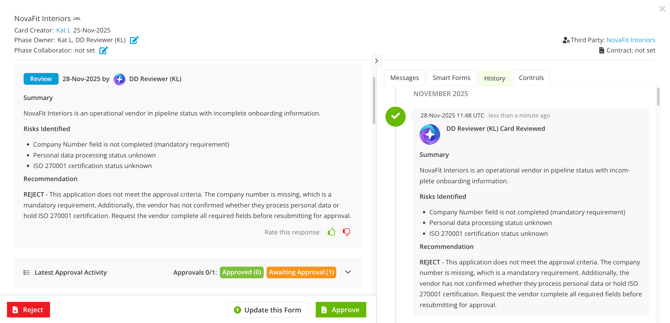
- Review: The agent assesses a workflow card and produces a summary or recommendation, but does not make a final decision. A human reviewer retains authority to approve or reject based on the agent's output.
- Form Update: The agent automatically populates or corrects workflow form fields when a card enters its phase. The agent reads available context (including any uploaded documents and existing field data) and updates fields according to its instructions.
Where Do Agents Fit into a Workflow?
Agents can be added to workflows in different ways, depending on whether they’re guiding the process or making decisions:
- Human-in-the-loop:
- An Approval agent can work alongside users in the same phase as a parallel approver, or independently before or after a user in a separate phase.
- A Review agent can evaluate the data and provide guidance, but leave the approve/reject decision to a user.
- A Form Update agent can automatically populate form fields, but does not submit the card. A user must review the output and manually submit the card to progress it.
- Fully autonomous: An approval agent can make an approve/reject decision entirely on its own, without human input.
Review Agent Activity
After an agent has completed a task, open the relevant workflow card to view a detailed account of the output. You'll see an entry with the Gatekeeper AI icon  , and an explanation of how it arrived at its output, whether that is an approve or reject decision, a recommendation or summary, or a record of the fields it updated and why.
This is also recorded in the History tab of the workflow card, so the output is always available for reference, even after the card has moved to another phase.