
 Estimated Read Time: 3 Minutes
Sections in this article:
Edit a User
You can make changes to a user's core account details directly in Gatekeeper. This is recommended when you have changes to make to a small number of users. To make changes to users in bulk, it's recommended to use the export and import functionality to do this efficiently.
Note: Users must be Global Administrators with the Users additional permission to edit other users. See User Role and Permission Definitions for further information.
To edit a user's account details:
- From the navigation menu, expand the Settings option, then click Users.
- Expand the 3 dots on the relevant row, then select Edit.
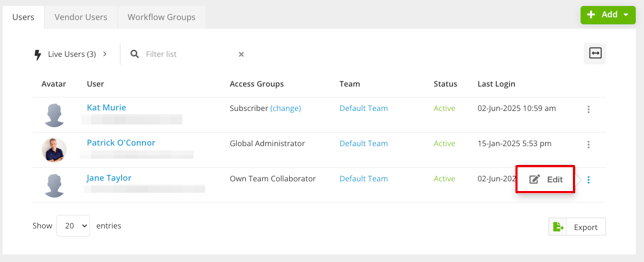
- Update the personal data, roles, and permissions as needed. From here, you can also resend the invite email or revoke the user's access.
-
Click Save.
Note:
-
If an employee has been granted access to Gatekeeper as an administrator, collaborator, or custom RBAC role, they cannot then be downgraded to an Employee Portal Only user.
- To update other settings, such as notification preferences, default dashboards, and record ownership, navigate to the user's profile by clicking their name from the Users list. See View Existing User Details for more information.
FAQs