
Gatekeeper is the only unified platform for managing third‑party compliance, contracting, and spend—screening every partner upfront, accelerating time‑to‑agreement, and continuously monitoring for risk and savings—so companies stay protected and compliant, reduce costs and move fast.
This month brings powerful enhancements across Gatekeeper’s AI capabilities, custom dashboard infrastructure, third-party engagement, and workflow management.
LuminIQ Updates
LuminIQ is Gatekeeper's AI — the intelligence layer built into the platform. You already know what it does with your data: extracting key terms from contracts, analysing clauses, surfacing risk signals, turning unstructured documents into structured insights. That's LuminIQ working behind the scenes to make information useful.
LuminIQ Agents sit on top of your existing workflows and the automation you've already built in Gatekeeper. They don't just analyse, they execute. They don't queue, triage, or wait. The moment a task lands, an agent is already working: reading, collecting, chasing, routing, surfacing what you need — hand-in-hand with the workflow engine you already rely on. By the time you click in, the work is done. You keep the judgment. Agents handle the execution around it.
Improved Agent Assignment on Workflow Phases
Why it matters:
LuminIQ Agents do the prep work before you arrive. When you open a task, context is already waiting—budget data pulled, third party duplicates flagged, non-standard clauses highlighted, ESG scores checked. You're not searching for information; you're reviewing insights and making the call. Agents handle execution. You keep the decisions.
What's new:
Phase owners can now be assigned alongside a LuminIQ Agent on any workflow phase. The agent analyzes context, reviews data, and surfaces a briefing note directly on the card—while the phase owner maintains full approval authority. Nothing moves forward without human sign-off.
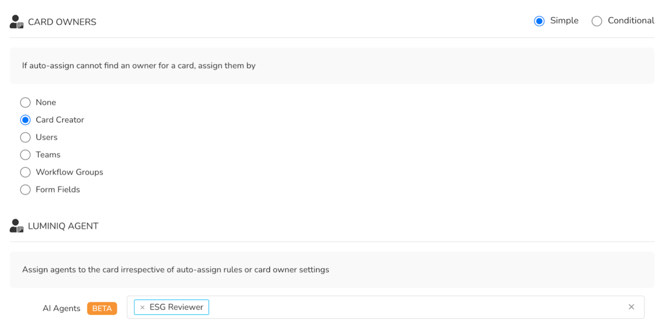
Who benefits: Anyone who opens a workflow task and needs context before they can decide. A few examples:
-
Contract reviewers — the agent has already summarized the agreement and flagged deviations from your playbook before you open the task.
-
Third-party onboarding reviews — a new third-party request arrives with company data already pulled, documentation reviewed, and anomalies flagged.
-
Finance approvers — spend history, budget comparison, and threshold alerts assembled before you reach the sign-off phase.
-
Renewal decision-makers — performance scores, spend vs. commitment, and risk status waiting for you when the task opens.
These are just a few examples — any workflow phase where preparation work happens before a decision can now have an agent doing that preparation automatically.
See how LuminIQ agents can do the work for you.
Centralized View of LuminIQ Agent Decisions
Why it matters:
When humans and AI agents work together, you need a clear record of who did what and when. Without it, audit prep becomes a scramble through scattered records.
What's new:
Workflow Card History now includes powerful filtering to isolate LuminIQ Agent activity across the full lifecycle.
New saved filters organize history by phase movements, submissions, approvals, actions, delegations, and archive events—with a dedicated "Show Approvals Only" mode for isolating human approvals, AI approvals, and AI reviews.
Each entry shows phase name, approver (including agents), timestamp, outcome, and expandable comments.
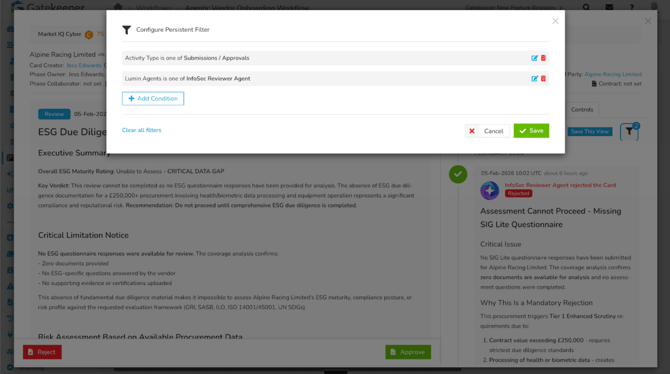
Who benefits: Compliance leads, risk managers, and audit teams who need a defensible decision trail showing exactly when AI flagged risks and when humans validated them.
Third-Party Portal
Gatekeeper's Third-Party Portal is the digital front door for your suppliers, vendors, and partners — the space where they interact with your organization, completing forms, submitting documents, responding to requests, and accessing the resources they need. The portal already pushes work directly to third parties so they can act without waiting for your team. This release takes that further, giving third parties the tools to be even more proactive — initiating requests, accessing guidance, and tracking their own progress without needing your team to point them in the right direction.
Third Party Portal Redesign
Why It Matters: Third-party engagement just became proactive instead of reactive. Suppliers, vendors and partners can now initiate actions, access resources, and track progress without waiting for your team to provide links, answer questions, or manually route requests. This shifts your team from handling routine inquiries to focusing on strategic third-party relationships and exceptions.
What's New
Four integrated enhancements transform the third-party experience:
- Redesigned Dashboard: Consolidated home screen showing open forms, upcoming events, recent messages, and quick links—everything requiring attention in one place.
- Useful Links: Direct access to governance policies, third-party standards, onboarding guides, invoicing instructions, and category-specific guidance as supplied by you.
- Direct Request Submission: No more chasing third parties for updated details. With direct request submission, third parties can kick off workflow requests on their own — whenever something changes, like an address update or an expiring certificate.
- Modernized Login Experience: Clearer pathways and enhanced responsive design.
How This Benefits You:
- Fewer repetitive questions from your Third Parties mean more time for strategic work
- Third Parties see what's expected and when it's due, reducing missed certifications and expired documentation
- Faster processing cycles because third parties submit updates and requests on their timeline without waiting for your team to respond to emails
- Better compliance outcomes because visibility drives proactive action before deadlines pass
- Stronger third-party relationships because the experience is modern, intuitive, and respects their time
Dashboards
Your contracts, third parties, risk, and spend — all in one view, built your way. This month, Custom Dashboards go further: more data to explore, more control over who sees it.
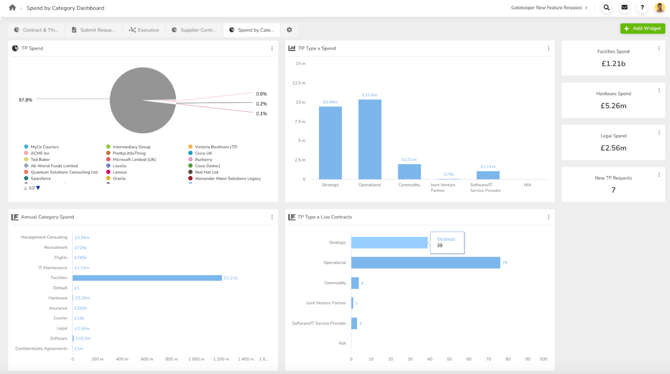
Dedicated Third-Party Dataset
Why It Matters:
Custom Dashboards give you powerful analytics capabilities and expanded datasets, bringing contract and third-party data together so you can report across both — all in one unified view.
What's New:
Make Third Parties reportable with core and custom Third-Party fields.
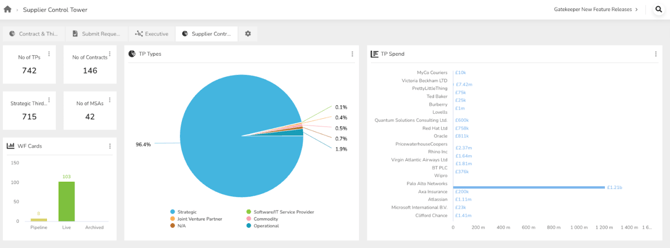
Answer questions like:
- How many active third parties by category, region, or tier?
- What's the distribution by risk rating?
- Which third parties have incomplete onboarding or missing certifications?
How This Benefits You:
Build the dashboards and reports your teams actually need without exporting data or manual compilation. Create executive dashboards, compliance views, and operational reports with data that updates automatically. Each dataset gives you new reporting angles to spot patterns, forecast capacity constraints, and make data-driven decisions.
Dashboard Counter Click-Through Alignment
Dashboard counter click-throughs now filter to Live records only, matching displayed counter values, ensuring consistency between dashboard displays.
Updated Report Permissions
Predefined reports now automatically filter data based on the logged-in user's access permissions, ensuring users only see records they have permission to view. The system applies access levels (Owned Only, Own Team, Global, Custom RBAC) consistently across all predefined reports—Contract Reports, Third-Party Reports, Risk Management, Department Reports, Spend Reports, Workflow Reports, Project Reports, and Categories.
Report results automatically match the access controls applied throughout the rest of the platform.
Eliminates risk of users accessing sensitive contract, third-party, or financial information outside their authorized scope while maintaining proper data governance.
Additional Updates
Enhanced List View Filtering in The Vault
What's New
List views now support the same advanced filtering capabilities as Custom Dashboards with identical UI and logic. Enhanced filters support additional field types and operators. Save filtered views for quick access to commonly used list configurations.
Business Impact
A unified filtering experience across dashboards and list views— now with far more granular control. Filter across third parties, contracts, workflows, risks, projects, teams, categories, entities, events, and files to get exactly the view you need. Save it for next time, or export the data and take it further.
New Custom Groups/Field Options API Endpoint
You can now create, update, and delete custom groups, custom fields, and their options directly through the Gatekeeper API. Previously limited to read-only GET endpoints, the API now supports full CRUD operations—giving you programmatic control over your custom data structure without manual setup in the UI.
Multi-File Upload in Contracts List View
You can now upload multiple contract files at once through the List View File Upload option. Brings List View functionality in line with multi-file upload capabilities in the record's Files tab and Lumin Extract, streamlining high-volume contract workflows.
Dynamic Third Party Owner Selection
External Owner (Third Party Contact) field now dynamically updates based on Third Party selection, automatically clearing previous contacts and showing only contacts from the selected third party.