
TL;DR
- LuminIQ Review Agent automatically reviews workflow cards against customer policies and generates an auditable, human-in-the-loop summary directly on the card. This allows you to track the time saved on each review and translate those efficiencies into measurable FTE savings.
- eSign now lets users set or prefill the Master Record during signing and run multiple eSign processes on a single workflow card.
- Scorecards can be quickly cloned from the list view so teams can reuse proven templates for consistent performance and risk assessment.
- Third Party Portal users from the same organisation can see each other’s uploaded files, creating a single, collaborative space for key documents.
- Backend, integration updates unify contract–third party relationship data, add delete actions, and improve mapping and forms so records stay cleaner and better synced.
LuminIQ
LuminIQ Agents Migration to AWS Bedrock
Whats new: In September, we saw LuminIQ Core Features (Summary, Insights and Extract) migrate to AWS Bedrock. This release sees our LuminIQ Agents follow suit.
Why it matters: The move deepens our commitment to data sovereignty, ensuring your data always stays within your chosen region. Migrating to AWS Bedrock also boosts agentic performance with faster processing, more reliable infrastructure built for long-running agents, and integrated memory and tools that support complex workflows at scale. This provides a stronger foundation as LuminIQ continues to grow.
"By moving to AWS Bedrock, we can respect customer data sovereignty and deliver a major leap in agent intelligence. Our upgraded framework enables richer context handling and smarter decisions when reviewing complex, multi-document workflows," - Tom Flanaghan, AI and Product Management Lead
What do I need to do: Nothing. For the majority of our customers, this will happen automatically, with no visible change. If you want to get started with LuminIQ Agents, please let us know here.
Check out our AI Security Paper for additional information on our AI terms and how we protect your data.
LuminIQ Review Agent
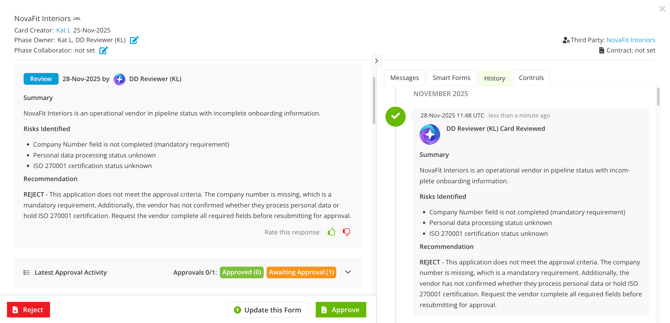
Whats New: A configurable agent that analyses the information on an active Gatekeeper workflow card. It follows a customer’s instruction criteria that reflect their policies and processes, then posts an auditable review back to the same card. The agent is designed for review only and supports human-in-the-loop decisions. Gatekeeper builds, configures and deploys all LuminIQ agents for customers, validating behaviour and outputs in a safe environment and confirming they work as intended before going live, so customers receive the highest level of support.
Why it matters: It reads every field and file on a workflow card, applies customer instructions, and writes back auditable findings in seconds, delivering three guaranteed outcomes:
- 98% Faster Reviews: What takes days manually now completes in seconds, translating into hours saved per review.
- Accelerating Business Outcomes: Getting to work with third parties faster whilst covering all risks, following process, and getting compliant contracts in place is a competitive advantage.
- Strategic Focus: Procurement, Legal, and Finance teams redirect effort to negotiations, risk mitigation, and strategic decision-making instead of manual data review.
How it works:
- Read the card’s fields and attached files.
- Apply the customer’s instruction criteria that reflect policy and process.
- Summarise findings in clear language and reference the fields or filenames involved.
- Write back the review to the card for the responsible party in the current phase.
Who benefits:
Procurement & Vendor Management: Get instant summaries of security questionnaires, risk assessments, and third party documentation. The agent extracts risks to track, flags policy violations, and delivers consistent reviews across onboarding, performance management, and renewals.
Contract Management & Legal Ops: Pre-review contract drafts with specific redline recommendations before they reach Counsel. Post-signature, get clean obligation extraction and risk summaries for stakeholder handovers.
Legal (Counsel & GC): Review contract terms with clause-level insights and redline recommendations tied to workflow context. Spend time on high-risk decisions, not reading page-by-page or creating summaries.
Finance (CFO, FP&A, AP) — Automated reviews of spend approvals against threshold policies, invoice-to-contract alignment checks, and risk summaries from financial terms.
Scope: Available to all customers who have agentic workflows. Please contact your Account Director if you want access.
For more details, see the LuminIQ - Lumin Agents Overview Knowledge Base article.
eSign Improvements
eSign Master Record Prompt
What's New: Users can now establish or update a Master Record directly within the eSign process. The feature is available in all eSign workflows to users with sufficient permissions.
Why it matters: Ensuring contract metadata is accurate from the start prevents downstream data errors and improves overall contract management efficiency. This accuracy enables a reliable Contract Preview, allows teams to use LuminIQ in the Contract Vault for summaries and obligation insights, and supports automated renewals—so no renewal is ever missed, and no unnecessary spending occurs.
How it works:
- Start the eSign process from the relevant workflow card.
- When the eSign window opens, you will see whether a Master Record is already set for the contract.
- If you want the file you are sending for eSign to become the Master Record, select the checkbox to assign it as the Master Record.
- Once selected and the eSign process is started, this file is saved as the Master Record for that contract.
Who benefits:
Procurement: Can initiate eSign workflows with confidence, knowing the Master Record is set correctly before signatures are collected, reducing rework.
Legal: Gains immediate clarity on which contract version is authoritative, eliminating confusion during reviews, audits, or disputes.
Finance: Receives structured, accurate contract data from day one, improving accrual accuracy and ensuring renewal forecasts and obligation tracking are based on the correct contract version.
C-Suite:Sees higher compliance rates and reduced operational risk as teams consistently establish Master Records during the eSign process, rather than correcting errors after the fact.
Scope: Available to all customers using our eSign functionality.
Multiple eSign Process within a single workflow card
What's new: This feature enables multiple eSign processes within a single workflow card, allowing different files to be sent for signature independently.
Why it matters: This release ensures clear visibility of every eSign process on the card and enables signers to review all necessary documents in a single eSign session, improving efficiency and user experience. At the same time, it adheres to existing eSign and workflow conventions while enhancing overall functionality.
How it works
- Open the relevant workflow card where you want to manage multiple signatures.
- Start the eSign process for your file, configuring the signatories for each document (they can be the same or different people).
- Once complete, select any ancillary files that should be included with each eSign process and set up as previously.
- Use the consolidated eSign area on the card to view all processes together, including their signatories and current statuses.
- Allow the workflow to progress automatically: the phase transitions when all eSign processes are completed successfully.
Who benefits:
Procurement: Can bundle all documents for a third party or sourcing event into one workflow card, reducing admin overhead and ensuring approvals and signatures move together through a single, controlled process.
Legal: Gains stronger control over multi-file agreements, ensuring that all related documents (MSAs, SOWs, appendices) are complete, which supports enforceability, governance, and auditability.
Vendor Management Teams: Can oversee all third party-related documents and signatures in a single, organised process, making onboarding and ongoing management faster and more controlled.
Scope: Available to all customers utilising our eSign functionality.
Prefill Master Record when setting for eSign
When sending a file for eSign from a workflow, the Master Record and Host are now pre-selected where possible. This streamlines the experience so users do not need to worry about choosing the correct file version or host before starting the signature process.
To learn more, see the following Knowledge Base articles:
Core Improvements
Scorecards | Ability to clone existing Scorecards
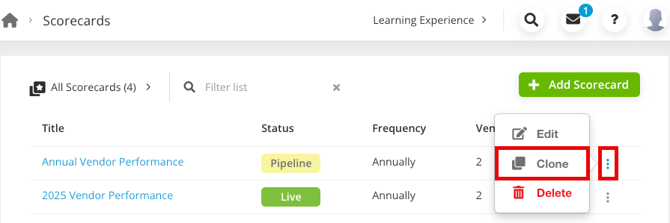
What's new: Gatekeeper Administrators can now clone existing Scorecards directly from the Scorecards list view, making it faster to create new Scorecards based on proven templates.
The Scorecards list view now uses an ellipsis (⋯) menu in place of the previous Delete icon. The ellipsis menu provides three options:
- Edit (existing behaviour)
- Clone (new)
- Delete (existing behaviour)
Why it matters: This enhancement removes the need to manually recreate every dimension and configuration, helping teams standardise and scale their performance and risk assessment processes more efficiently.
Who benefits:
Procurement can rapidly spin up new scorecards for third party evaluation, improving agility in onboarding and consistent risk/quality measurement.
Rapid duplication means Finance teams can assess new or changing third parties with minimal lead time, keeping procurement and budget cycles on track.
Legal can create new compliance or risk scorecards by reusing existing scorecards, thus eliminating repetitive setup for similar contracts or regulatory frameworks.
Scope: Available to customers with the Scorecards Module.
For more details, see the Create a Scorecard Knowledge Base article.
Third Party Portal | File Visibility for Third Party Users
What's new: In the Third Party Portal, users can now see files uploaded by other third party users within the same Third Parties and Contracts they share.
Why it matters: This allows all users to access the documents relevant to them in a single place, making it easier to find, review, and reuse key artefacts such as compliance certificates and policy documents without relying on scattered email threads.
How it works:
- Third Party user A uploads a file to Contract Y on the Third Party Portal
- Third Partu user B can view this file as they have access to Contract Y
- Third Party user X does not see this file in their Third Party Portal as they do not have access to Contract Y
Who benefits:
Third Parties benefit from a collaborative workspace where colleagues can see each other’s uploads, ensuring nothing is missed during onboarding, renewals, or due diligence cycles.
Procurement can coordinate document collection across multiple third party contacts in one shared space, reducing chasing, duplication, and version confusion.
Compliance teams can more easily verify that mandatory documents have been provided, are current, and are visible to all relevant third party users.
Scope: Applies to all customers using the Third Party Portal, subject to configured Third Party/Contract access.
For more details, see the Using The Vendor Portal Knowledge Base article.
API
Unifying contract/third party relationships tables for parent, child, and link
Gatekeeper now uses a single, unified structure to store contract–third party relationships, bringing parent, child, and linked relationships together in one place. This makes relationship data easier to manage and prepares it to be accessed consistently through the API.
Add support for contract and third party relationships
This update adds API support for managing contract and third party relationships. Users can now create and maintain these objects via the API, keeping relationship data in sync across systems.
For more details, see the Gatekeeper API Knowledge Base article.
Custom Tabs | Layout - Change Default to Sidebar
This release updates the default layout for Custom Tabs and Smart Forms from Simple to Sidebar and also ensures Smart Forms from workflow templates use the Sidebar layout.
For more details, see the Custom Tabs Knowledge Base article.
Workflows
Owner Roles on Workflow Forms
Workflow form submitters can now assign users to any owner kinds configured in their tenant directly from workflow forms. New workflow sections automatically include all owner kinds, while existing sections remain unchanged.
What do I need to do: For existing sections, add any custom Owners from your tenant onto your core Third Party or Contract Workflow sections to allow form submitters to define roles.
All Auto-Actions and Manual Actions for creating and updating Third Parties and Contracts will now support all custom-built owner kinds.
For more details, see the Configure Additional Owners Knowledge Base article.
Integrations
Interconnect | Add DEL actions
We have added Delete (DEL) actions for several object types—Third Party, Contracts, Spends, Contract Owners, Third Party Owners, Contract Links, and Third Party Links—in the Interconnect integration. This will enable recipe builders to delete these records via API.
NetSuite App Updates
Exposing NetSuite phones and emails to GK
This update allows you to map and sync a wider range of phone numbers and emails linked to a third party into NetSuite, not just the two fields previously available (Main and Alternative Phone Number). This gives teams more flexibility and accuracy when keeping third party contact details aligned between systems.
Change the third party user phone name in the mapping setting
We have changed the naming for the Third Party User phone numbers so that it is displayed consistently in the GK mapping settings to reduce confusion.
Add NS email type field support to our mapper
NetSuite users can now map a single-line text custom field in Gatekeeper to an Email field in NetSuite, making it easier to sync email addresses between the two systems.
For more details, see the NetSuite Integration Guide Knowledge Base article.
These features are available now in your Gatekeeper instance. For implementation guidance, configuration steps, and best practices, see the knowledge base articles linked under each feature above.
Questions? Contact your Account Director
Gatekeeper is the only unified platform for managing third-party compliance, contracting, and spend—screening every partner upfront, accelerating time-to-agreement, and continuously monitoring for risk and savings—so companies stay protected and compliant, reduce costs and move fast.