
Key Highlights
Gatekeeper Enrich is here: retrospectively extract data into empty custom and core fields across contracts already in your repository, so your reporting runs on complete records. No more backfilling by hand.
Custom Dashboards can now be shared with individual users or entire teams, so everyone works from the same view.
Workflows get two major upgrades:
- Clone Contract Auto Action: workflows can now clone contracts automatically, with an explicit relationship type.
- Smarter access management: extend automatic card visibility to a creator's manager or whole team, and assign workflow admin and collaborator access by Workflow Group or Team rather than one user at a time.
Gatekeeper Enrich
Enrich your existing contract data retrospectively, powered by AI
Enrich is a new capability of Gatekeeper Extract, our AI data extraction engine. Extract reads contracts at the point of upload; Enrich applies the same extraction to contracts already in your repository. If you have Extract enabled, you have Enrich.
The problem it solves. Until now, data extraction only applied to contracts at the point of upload. If you added a new custom field, or marked an existing one for extraction, contracts already in your repository stayed empty against those fields. Backfilling meant opening contracts one by one and keying data in by hand.
What's new. Enrich lets you select contracts already in your repository and send them for enrichment. Enrich reads each contract's master record and populates the fields you have marked for extraction, across your whole selection in one job.
How it works. An Administrator filters the contract list, initiates the enrichment process using the button at the bottom of the contract list, chooses the fields to enrich, and submits. Non-administrators will not see the button.
Key details:
- Enrichment only fills empty fields; values you have already populated are never overwritten.
- Only fields marked for extraction and assigned to the contract's type are eligible, and contracts must have a master document attached in a supported format — PDF or Word (.docx).
- Review everything the AI populated: every enrichment job has a detail page — open the Enrich tab within Gatekeeper Extract and select the job. AI-found values are marked with a sparkle icon, and skipped fields carry a tooltip explaining why (for example, "Value already exists"), so there is always a reviewable record of what was populated.
- Available to Admins (with contracts they have access to) with the “Data Extraction” toggle enabled in the AI Services settings.
- Contracts updated or removed while a job is running are safely skipped rather than overwritten.
- This feature is currently in beta and is limited to 100 contracts at a time.
See it in action:
What it means for your team. Enrich is run by your Gatekeeper Administrator, but the results benefit every team. Every team's reporting is only as complete as the contract data behind it, and historic gaps affect everyone differently — ask your administrator to run Enrich against the contracts and fields that matter to you:
- Legal and Legal Ops: fields added after go-live, such as governing law, notice period or liability cap, are finally populated across legacy contracts, so clause searches, renewal alerts and portfolio reviews run on complete records.
- Compliance and Risk: when a new regulation demands a data point across every in-scope contract, backfill the historic ones in a few clicks instead of collating by hand, with AI-found values clearly marked in the job detail view so there is a reviewable record of what was populated.
- Procurement: notice periods and renewal types get filled across the whole supplier book, not just recent contracts, so auto-renewals stop slipping through gaps in the renewal report.
- Finance: committed values, renewal dates and payment terms populate across the estate, so quarter-end reporting and audits reconcile on a complete dataset, with a source trail behind every figure.
Dashboards
Share Custom Dashboards with users and teams
Building a great dashboard no longer means keeping it to yourself. You can now share any Custom Dashboard with individual users or entire teams, giving everyone read-only access to consistent, standardised reporting without recreating dashboards from scratch.
- Share with individual users, specific teams, or a mix of both. Any user can share their dashboards, and team membership keeps access up to date automatically: new team members gain the dashboard, and leavers lose it.
- Recipients get read-only access, with shared dashboards clearly marked with a shared icon and "Shared by {Name}" in their dashboard list, so it is always obvious which dashboards are yours and which have been shared with you.
- Recipients stay in control of their own view: shared dashboards can be reordered or hidden from their Dashboard Settings without affecting anyone else.
- Any updates the owner makes to layout, filters or widgets are reflected automatically for all recipients, and the owner sees a warning before saving changes to, or deleting, a dashboard that others rely on.
- Sharing can be revoked at any time, and recipients are notified by email, with a direct link to the dashboard, when one is shared with them.
- Shared dashboards respect each recipient's own record permissions: a recipient only ever sees data their own user permissions allow, never the owner's view of it.
- Custom Dashboards remain available to recipients even after the owner's account is archived, so shared reporting is never lost when people move on.
See it in action:
Workflows
Clone Contract Auto Action
A new Auto Action lets workflows clone contracts automatically, with an explicit relationship type, streamlining amendments and renewals.
- Choose whether the clone is created as a linked, parent or child contract, and optionally archive the original.
- Select exactly which field groups carry over to the new contract, with all fields cloned by default.
- Cloning activity is fully recorded in workflow and contract history, so you always have a complete audit trail.
- Files are not carried over to the clone — only contract data is copied. Attach documents to the new contract as part of your workflow.
- If the original contract has already been archived by the time the action runs, the clone is not created, and "Auto Contract Clone voided" is recorded in the card history so the non-creation is always visible.
See it in action:
Expanded card visibility and group-based workflow access
Workflow access is now easier to manage at scale, with dynamic visibility and group-level administration.
Previously, view-only access followed the card creator alone, and anyone else who needed sight of a card had to be re-added manually as it moved between phases. Also, local admin and collaborator access could only be granted to one user at a time.
- New Dynamic View Only Access settings let you automatically provision read-only visibility based on the card creator's relationships: the creator themselves, their team manager, or their entire team. Access follows the card through every phase, with no manual re-addition on phase transitions.
- Local Workflow Administrators and Collaborators can now be assigned as Workflow Groups or Teams, not just individual users. When group or team membership changes, workflow access updates automatically to match.
See it in action:
- The phase and card collaborator selector supports Users, Workflow Groups and Teams, consistent with the pickers you already use for workflow ownership.
- Where someone holds both administrator and collaborator access, the higher level of privilege applies, so there is no risk of accidentally reducing anyone's access.
Market IQ
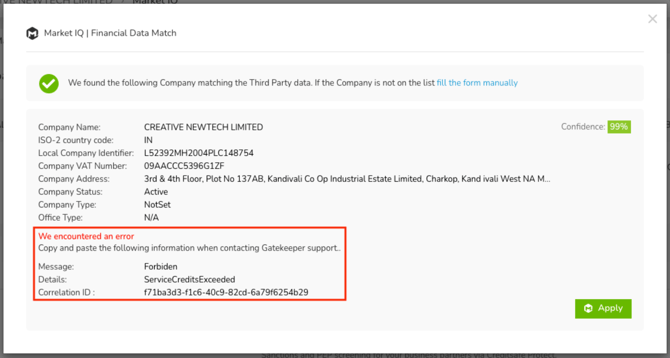
Error messages in Market IQ Financial now include the Creditsafe Correlation ID, so you can pass it straight to Gatekeeper Support for faster resolution.
Bulk Importing
- The Field Mapping Guide now shows format guidance for monetary custom fields, for example 10000.00 GBP, so imports are right first time.

- Bulk Import now automatically recognises many more common column names, such as "Vendor Name", "Counterparty" and "Agreement", and maps them to the correct Gatekeeper fields for you, so there is less manual mapping on every import.
Custom Tables
Message tagging now supports custom tables, mirroring the way you already tag form fields. When writing a message on a workflow card, use the hashtag (#) to tag a custom table, and the recipient is taken straight to it when they click the tag, making it easy to direct a colleague to exactly the right table within a workflow card.
See it in action: