
This release brings more of your third-party lifecycle into one place. Dashboards go further with drill-down on every custom widget and now draw on your full third party and contract dataset together, vendor timelines capture every NetSuite sync, and LuminIQ, built on Anthropic's Claude Sonnet 4.6, keeps getting smarter at working with your custom data model. CLM, TPRM and SPM, working as one platform, with fewer gaps, cleaner handoffs, and a single source of truth.
TL;DR
- Custom Dashboards drill-down — every custom widget now supports click-through to the underlying records, so you can investigate the spikes, dips, and anomalies underneath
- Group and filter contract widgets by third-party fields — bring Custom Dashboard logic in line with list-view, scoping contracts by third-party type, status, or any associated third-party field
- Lumin Extract retains type-scoped values — extracted values now persist after extraction, auto-populating when the contract type is corrected; no re-run required
- NetSuite sync events on the third-party timeline — every manual and automated sync (success or failure) now writes to the third-party's Lifecycle tab for full audit visibility
- API filtering by type — new
filter[supplier_type][]andfilter[contract_type][]parameters onGET /suppliersandGET /contractsfor targeted calls and lighter payloads - SCIM upgrades across the board — a new Provisioning Type column on the User Table to surface IdP vs direct accounts, expandable user context inside every SCIM group (names, emails, SCIM IDs, team assignments, cross-group memberships), and cleaner permission mapping with Scorecard groups and Sensitive Data now configurable at the IdP-group level
Custom Dashboards
Click into your Custom Dashboard widgets and see what's behind the numbers
You've been able to do this on predefined dashboards (Quarterly, Executive, and so on) for a while now. Click into a number, and Gatekeeper opens the table view of contracts, third parties, or other records driving it. From this release, that drill-down behaviour is available on every Custom Dashboard widget you build.
That means no more rebuilding views to investigate a number, no more switching between dashboard and list view to cross-reference what you're seeing, and no more waiting until later to find out what's behind a spike or a dip. The answer is one click away.
Who benefits:
- Procurement can investigate the third parties behind a renewal spike, the contracts stuck in the wrong status, or the segments that don't match what the team's been reporting — straight from the dashboard.
- Finance can validate spend and commitment numbers in real time, drilling from a dashboard total into the underlying contracts before signing off on a forecast or board pack.
- C-Suite can ask “what's behind that number?” in the meeting and get an answer immediately — turning dashboards into a live decision-making tool rather than a static report.
Group and filter contract widgets by third party fields in Custom Dashboards
When you're building a Custom Dashboard widget, the third party context behind a contract often matters more than the contract attributes themselves — you want to see your contracts split by third party type, scoped to live third parties only, or grouped by third party status. Custom Dashboard widgets now support grouping and filtering contracts by associated third party fields, bringing dashboard logic in line with the list-view experience you already use.
For step-by-step instructions on building your own personalised dashboards, see the Custom Dashboards article. Alternatively, take our Introduction to Reporting course on the Gatekeeper Academy to learn more about reporting options.
LuminIQ
Lumin Extract keeps your type-scoped values
Extracted values for type-scoped fields are now retained after extraction completes. When you correct the contract type and the relevant group becomes visible, the values populate automatically — no re-run required. The sparkle always reflects a genuinely extracted value.
For further details, see the Create Contracts Using Lumin Extract article.
NetSuite
NetSuite third party sync events now log to the third party timeline
Every NetSuite third party sync event now writes to the third party's Lifecycle tab, whether a NetSuite Administrator triggered it manually or a workflow AutoAction fired it automatically, logging the user's name who initiated the sync. Failed syncs are logged too. Clear ownership, clear outcome, no more cross-checking systems.
Read the NetSuite Integration Guide for further details on configuring the integration.
For IT & Developers
API: filter contracts and third parties in a single call
If you're pulling contract or third party data from Gatekeeper into a downstream system — a BI tool, a procurement dashboard, an internal app — you've had to fetch the full list and filter on your end. Fine for small estates, painful for large ones.
Two new query parameters fix that:
-
GET /suppliersnow acceptsfilter[supplier_type][]— request just Strategic third parties, just Preferred, or any combination of your tenant's configured types in one call. -
GET /contractsnowaccepts filter[contract_type][]— request just your MSAs, just your SOWs, or any combination of your configured contract types in one call.
Both filters are case-insensitive exact match, support multiple values with OR logic, and work alongside every existing filter. OpenAPI spec updated. Targeted calls, lighter payloads, simpler integration code.
Visit the Gatekeeper API article to learn more.
SCIM: see how every user is provisioned
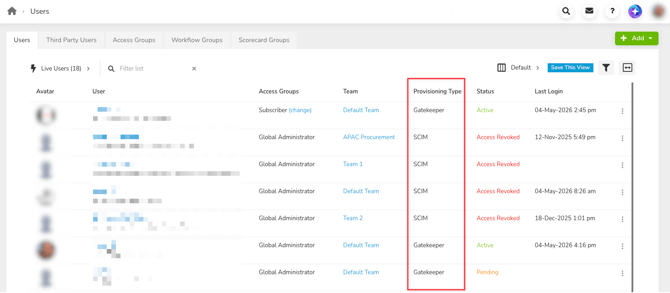
The User Table now includes a Provisioning Type column that shows whether each account was created directly in Gatekeeper or is governed by SCIM via your IdP (Okta, Entra ID, and others). Filter the list to surface ungoverned accounts, audit your provisioning coverage, or spot users who should be under IdP control but aren't — then export the view to CSV. Hidden by default, available in the column picker, persistent filter, and exports.
SCIM: full user context inside every group
Each SCIM group on the settings page now expands to reveal a full user table — names, emails, statuses, SCIM IDs, team assignments, and cross-group memberships, scoped by group. Copy a SCIM ID straight into your Okta or Entra logs, click through to a user's profile, see Active vs Pending at a glance, or use the view as a human-readable record for quarterly access reviews. No more raw API calls to get the context you need.

SCIM: cleaner permission mapping
Two upgrades to the SCIM group permissions page so users arrive correctly provisioned from day one:
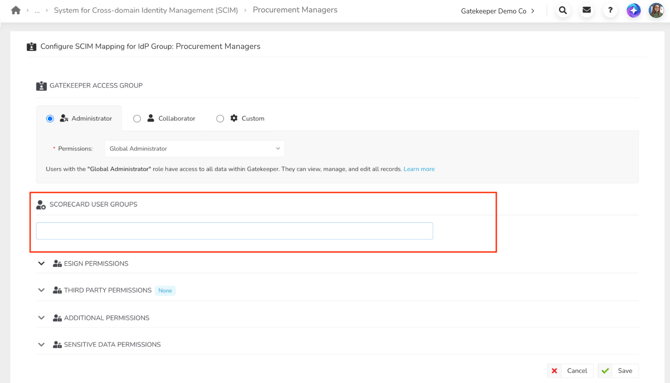
Scorecard groups — assign one or more Scorecard User Groups directly on the SCIM group permissions page. When a user is provisioned through your IdP, they arrive with the Scorecard access they need, ready to go.
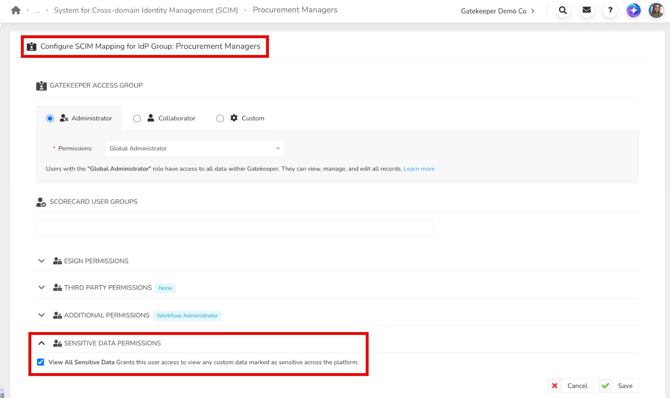
Sensitive Data permission — now available on the SCIM group permissions page, exactly as it appears on the manual Group permissions UI. Pre-configure who should see sensitive fields at the IdP-group level, and trust that every user provisioned into that group lands with the right access. No retroactive corrections, no inconsistent permission states.
For an overview of configuring SCIM, see Introduction to SCIM Integration with Gatekeeper.